
How to Recover a Deleted Telegram Account: The Definitive Guide

Last updated: October 2026
If you want to know how to recover a deleted Telegram account, the direct answer is you cannot. Once an account is deleted, the action is permanent and irreversible. This applies whether you delete it manually or Telegram removes it for inactivity. This guide explains the technical reasons for this policy. It also provides the correct procedure for starting over without losing your network.
To recover a deleted Telegram account means trying to regain access to an account and its data after it has been permanently removed. Understanding that this action is final prevents wasted time and focuses you on correctly setting up a new account to reconnect with your contacts.
Key Takeaways
- Confirm Deletion is Permanent: Telegram does not offer a recovery option for deleted accounts. Telegram purges all associated messages, media, and contacts from its servers.
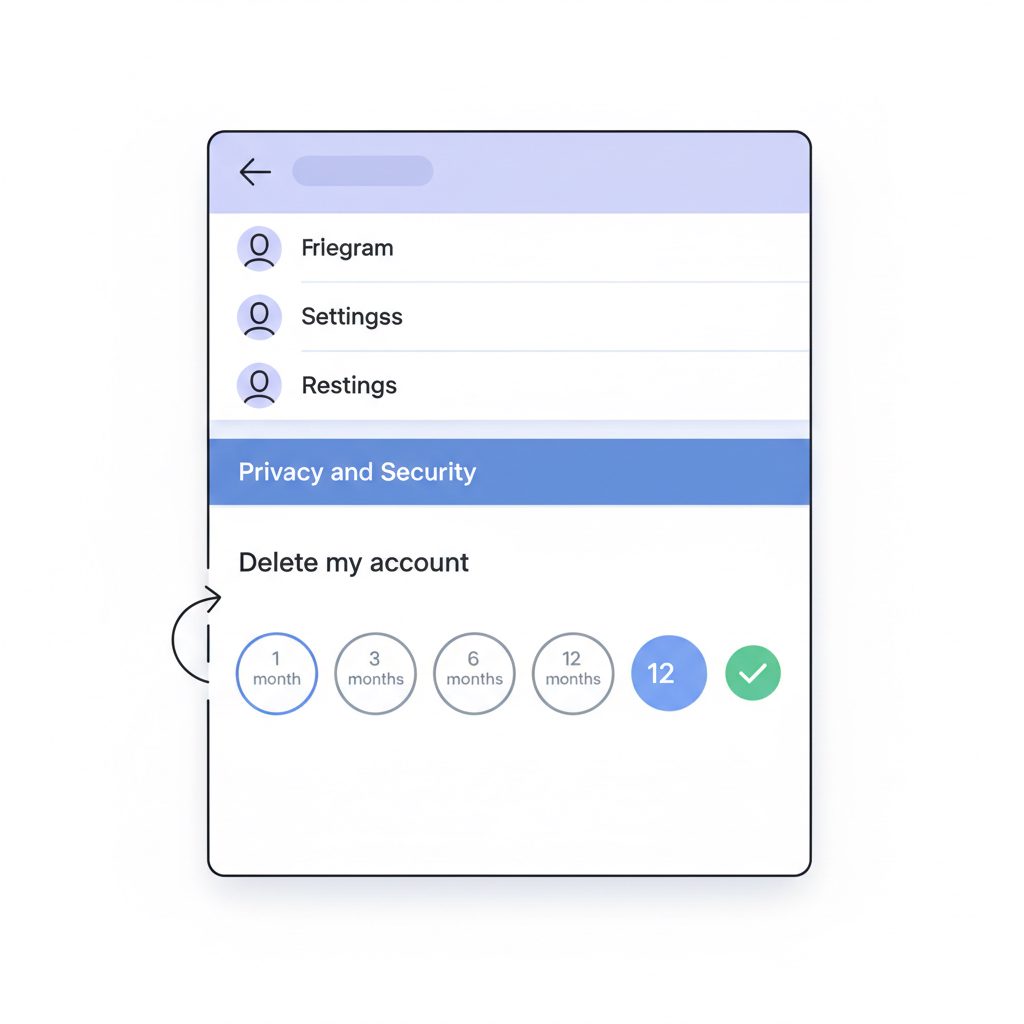
- Distinguish Deletion from Inactivity: You can set your account to self-destruct after 1, 3, 6, or 12 months of inactivity. This is a form of permanent deletion, not temporary deactivation.
- Secure a New Number: To create a new account, you will need a phone number. If you do not want to use your personal number, a virtual number is a viable alternative.
- Rebuild Your Network: Inform your contacts about your new account immediately. For business users, acquiring an established channel can speed up audience recovery.
- Adjust New Account Settings: Immediately set the inactivity self-destruct timer to 12 months. Also, enable Two-Step Verification to prevent future accidental loss.
Why Can't I Recover a Deleted Telegram Account?
Unlike platforms that offer a 30-day grace period, Telegram makes account deletion final. When you delete an account, Telegram erases all associated data from its production databases. This includes your messages, the groups you created, and your contact list. The company designed this action to be permanent, aligning with data privacy principles like the EU's General Data Protection Regulation (GDPR), which includes a “Right to Erasure”.
3h 49m — The average time per month that Android users spend on the Telegram app. — DataReportal, 2024.
Therefore, attempting to contact Telegram support to restore the account is ineffective. The system is automated, so support agents do not have the tools to reverse a database purge. Any service claiming they can recover a deleted account is misinformed or operating in bad faith.
The only way to move forward after account deletion is to create a new account.
Telegram's irreversible deletion policy is a technical and philosophical choice. By ensuring deletion is absolute, Telegram provides a clear privacy guarantee. When you request deletion, the data is gone, not just hidden or archived.
What's the Difference Between Deletion and Inactivity?
Telegram's inactivity self-destruct feature deletes many accounts, not just manual user action. This is a common point of failure for users who take an extended break from the app.
By default, Telegram sets your account to delete if it is inactive for six months. You can, and should, change this setting.
| State | Trigger | Data Status | Reversibility | Recommended Action |
|---|---|---|---|---|
| Manual Deletion | User-initiated via my.telegram.org | Immediately and permanently purged | None | Create a new account. |
| Inactivity Deletion | No logins for a set period (1-12 months) | Permanently purged after period ends | None | Log in before the timer expires. |
| Logged Out | User logs out of a device | Data remains on server | Fully reversible | Log back in with SMS/password. |
| App Uninstalled | User removes app from device | Data remains on server | Fully reversible | Reinstall app and log in. |
To prevent accidental deletion, navigate to Settings > Privacy and Security > Delete my account if away for... and change the period to the maximum of 12 months. This simple change is the most effective defense against losing your account due to a break or lost phone.
How Do I Start Over After Account Deletion?
The only path forward is to create a new account. While you cannot recover your old data, you can take methodical steps to rebuild your presence. This process requires a phone number, which can be your existing one (if Telegram has released it) or a new one.
Step-by-Step Guide to a New Telegram Account
-
Acquire a Phone Number: You can try using your old number. If Telegram says it is already in use, you must wait for the platform to release it, which can take days or weeks. For immediate access, consider a dedicated virtual number for Telegram, which provides a clean number for verification without a physical SIM card.
-
Download and Install Telegram: Get the official app from the App Store or Google Play Store.
-
Register the New Account: Follow the on-screen prompts. Enter your phone number and input the verification code sent via SMS.
-
Set Up Your Profile: Choose a new profile picture and username. Telegram does not guarantee when or if your old username will become available again, so it is often better to select a new one.
-
Enable Security Best Practices: Immediately navigate to
Settings > Privacy and Security. Set up Two-Step Verification with a strong password and a recovery email. This protects your account from access without your permission. -
Adjust the Self-Destruct Timer: Change the
Delete my account if away for...setting to 12 months. This provides the largest possible safety window. -
Rebuild Your Contact List: Telegram may automatically add contacts from your phone's address book if you grant it permission. For others, you will need to message them to re-establish the connection.
-
Notify Your Network: Send a concise message to your key contacts and any important groups, informing them of your new account. For example: "Hi, my old Telegram account was deleted. This is my new one. Please save this contact."
For business users or creators who lost a channel with a large following, the rebuilding process is more urgent. In these cases, acquiring professionally managed, aged Telegram channels can provide an established foundation to restart from, bypassing the slow grind of building an audience from zero.
900 million — Monthly active users on Telegram as of early 2024. — Forbes, 2024.
What Happens to My Old Username and Groups?
When your account is deleted, Telegram eventually releases the public username associated with it back into the public pool. However, the company does not publish an official timeline for this release. Scrapers and bots constantly monitor for high-value usernames to become available, so reclaiming a desirable one is not guaranteed.
According to Telegram's FAQ, if you delete your account, all your messages and contacts will be deleted beyond retrieval. Channels and groups you've created will be left without a creator, but admins will retain their rights.
If you were the sole creator and admin of a channel or group, it becomes ownerless. Any other admins you appointed will retain their permissions, but no one will have owner-level control. If the group had no other admins, it becomes unmanageable.
FAQ
Can Telegram Support help me recover my deleted account?
No. Telegram support cannot and will not restore a deleted account. The deletion process is designed to be permanent and automated. Any claims to the contrary are false.
Will I get my old username back?
Possibly, but it is not guaranteed. After an account is deleted, Telegram holds the username for an undefined period before releasing it to the public. You will have to manually check its availability. High-value usernames are often claimed by bots the moment they are released.
What happens to all my messages, photos, and files?
They are permanently deleted from Telegram's servers. This includes all one-on-one chats, group messages, and media shared from your account. There is no backup or archive you can access. Telegram purges the data to protect user privacy.
Can I create a new account with the same phone number?
Yes, but you may have to wait. Telegram often imposes a waiting period after an account is deleted before the associated phone number can be used for a new registration. This can range from a few days to several weeks.
What to do this week
- Check Your Inactivity Timer: Open Telegram, go to
Settings > Privacy and Security, and ensure yourDelete my accounttimer is set to 12 months, not the default 6. - Enable Two-Step Verification: If you haven't already, set up a password for your account. This is your best defense against unauthorized access and a critical recovery tool if you lose SIM access.
- Audit Your Admin Permissions: If you own important groups or channels, ensure you have at least one other trusted user assigned as an admin. This prevents the channel from becoming ownerless if your account is lost.
- Back Up Critical Information Off-Platform: For any truly essential data, do not rely solely on Telegram's cloud. Use the 'Export Telegram Data' feature on the desktop app to create a local backup of your chats.